
The Complete Guide to System Design in 2026
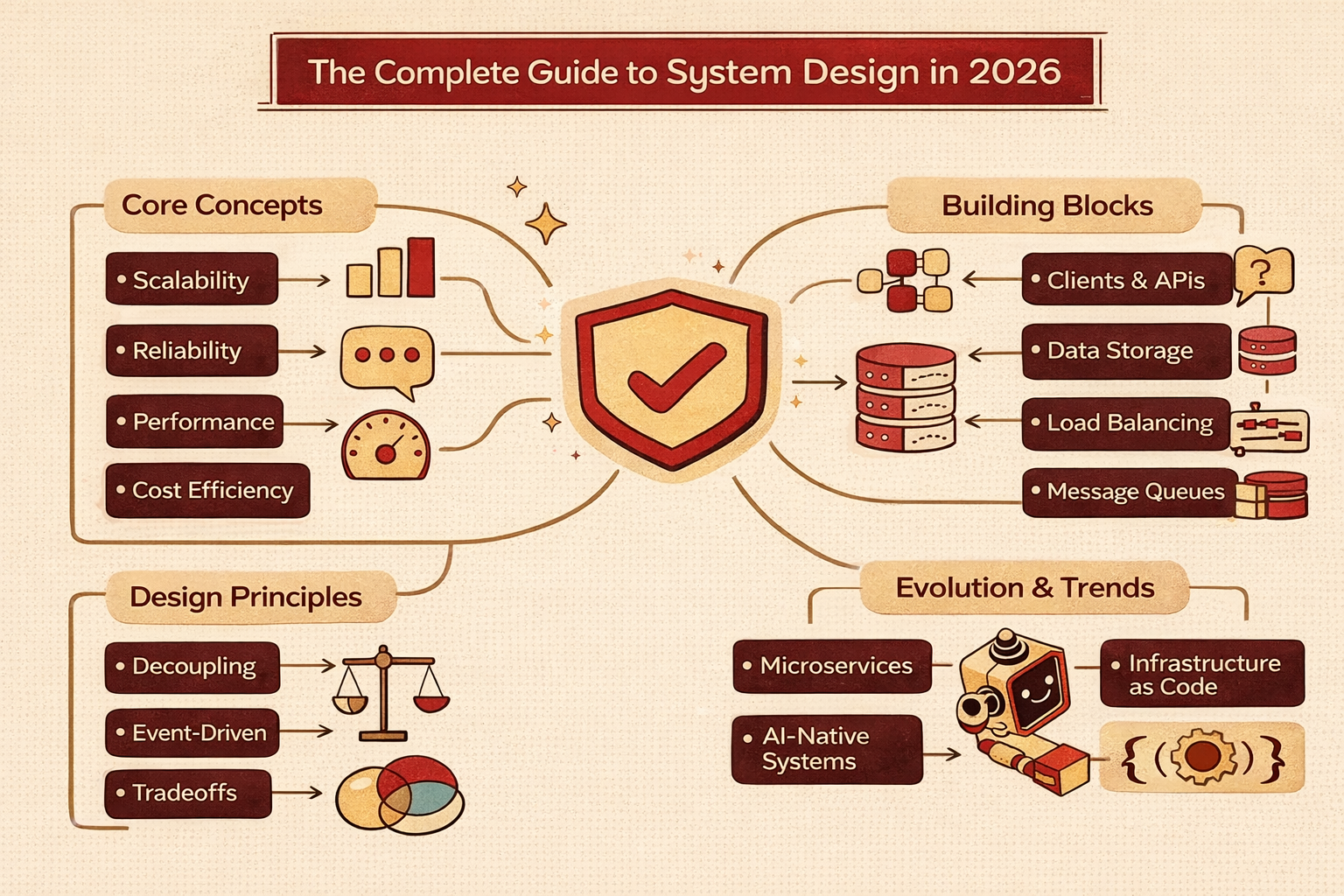
System Design is one of those skills that quietly separates average engineers from consistently impactful ones. You might write clean code, pass unit tests, and ship features, but the moment a product needs to scale, handle failures, or support millions of users, System Design becomes the real differentiator.
This guide is written to help you understand System Design as a practical engineering discipline, not just an interview topic or a collection of buzzwords.
What this guide is about
This guide walks you through System Design from the ground up. Instead of jumping straight into complex architectures, it starts with fundamentals: what System Design actually means, what problems it tries to solve, and how engineers think when designing systems.
As you progress, you will explore:
- Core System Design concepts that appear repeatedly in real systems
- Common architectural building blocks and how they interact
- Design principles that influence scalability, reliability, and performance
- A structured way to approach open-ended System Design problems
The goal is not to memorize patterns, but to build intuition.
Why System Design matters today
Modern software systems are no longer single applications running on a single server. Even small products today rely on distributed services, cloud infrastructure, third-party APIs, and global users.
System Design matters because:
- Systems must scale predictably as traffic grows
- Failures are inevitable and must be handled gracefully
- Performance expectations are high, even under load
- Cost efficiency matters just as much as technical correctness
Poor System Design decisions compound over time, leading to outages, rewrites, and operational chaos. Good System Design, on the other hand, enables teams to move faster with confidence.
How System Design has evolved
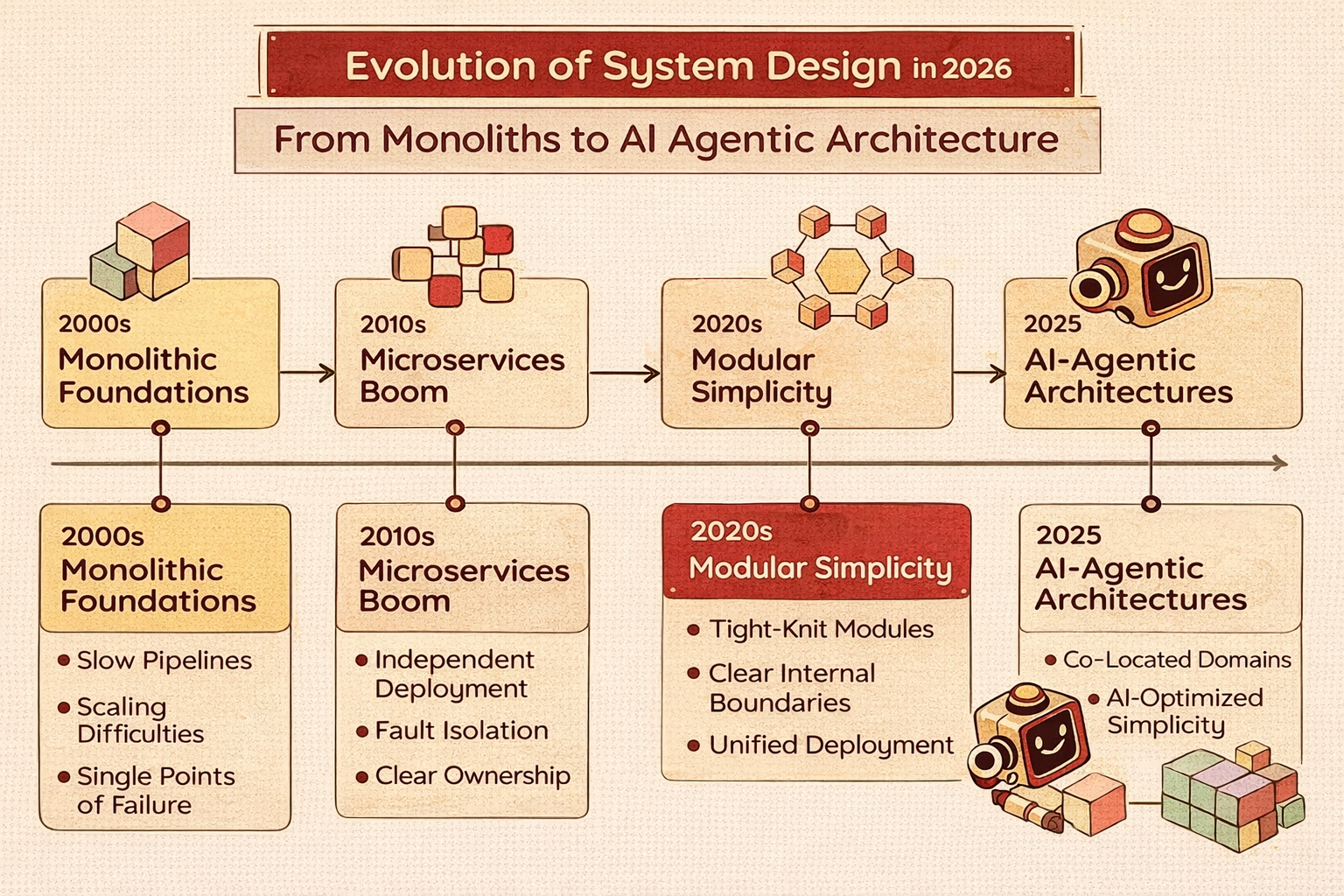
System Design today looks very different from a decade ago. The rise of cloud platforms, containerization, managed databases, and event-driven systems has shifted how engineers think about architecture.
Some notable shifts include:
- Moving from monoliths to microservices and modular systems
- Designing for failure instead of assuming perfect uptime
- Treating infrastructure as code
- Prioritizing observability and monitoring from day one
Understanding these trends helps you design systems that are relevant and future-proof.

What Is System Design?
Before diving into tools, patterns, or architectures, it’s important to clarify what System Design actually means.
At its core, System Design is the process of defining how different components of a system work together to meet specific requirements.
Defining System Design
System Design involves:
- Translating requirements into technical solutions
- Deciding how data flows through the system
- Choosing appropriate technologies and architectures
- Anticipating growth, failures, and constraints
It is not about writing code line by line. It is about making high-level decisions that shape how code behaves at scale.
System Design vs coding
Coding focuses on how a component works internally.
System Design focuses on how components interact.
For example:
- Coding: Implementing a queue
- System Design: Deciding when, where, and why to use a queue
A well-designed system can tolerate imperfect code. A poorly designed system will fail regardless of how clean the code is.
High-level vs low-level design
System Design is often divided into two layers:
High-level design
- Overall architecture
- Major components and their interactions
- Data flow between services
- Scalability and reliability strategies
Low-level design
- Class structures and APIs
- Database schemas
- Detailed workflows and edge cases
This separation is important because many engineers confuse System Design with low-level implementation details. In practice:
- High-level design answers “What are the major parts of the system, and how do they communicate?”
- Low-level design answers “How exactly does each part work internally?”
When people fail System Design interviews or struggle with real-world architecture, it’s usually because they jump into low-level details too early. Strong System Designers stay at the right level of abstraction for as long as possible, only diving deeper when necessary.
Common misconceptions about System Design
There are a few recurring myths that make System Design seem more intimidating than it actually is.
Misconception 1: System Design is only for senior engineers
In reality, every engineer makes System Design decisions—sometimes without realizing it. Choosing a database, adding a cache, or introducing a background worker are all design decisions.
Misconception 2: There is a “correct” architecture
System Design is about tradeoffs. Every decision optimizes for something while sacrificing something else. There is rarely a single correct answer, only contextually appropriate ones.
Misconception 3: You need to memorize architectures
Memorization helps less than understanding why systems are designed the way they are. Once you understand the reasoning, you can design new systems without copying existing ones.
The System Designer’s mindset
Good System Designers think differently from pure implementers. They constantly ask:
- What happens when this component fails?
- What happens when traffic increases by 10x?
- Where are the bottlenecks likely to appear?
- What assumptions am I making about usage?
System Design is less about perfection and more about anticipation and adaptability.
Core System Design Concepts
Almost every large-scale system, regardless of industry or technology, relies on a shared set of foundational ideas. These concepts reappear in different forms across web services, mobile backends, data platforms, and distributed systems.
Understanding these building blocks allows you to recognize patterns instead of starting from scratch each time.
Storage mechanisms and data persistence
At the heart of most systems lies data. System Design requires making deliberate decisions about:
- Where data is stored
- How it is accessed
- How it is protected from loss
Persistent storage can take many forms: relational databases, key-value stores, document databases, object storage, and more. Each option has different implications for performance, scalability, and consistency.
The key design question is not which database is best, but which database best fits this system’s access patterns and constraints.
Data partitioning and sharding
As data grows, storing everything on a single machine becomes impractical. Partitioning, often referred to as sharding, is the process of dividing data across multiple storage nodes.
Design considerations include:
- How data is divided (by user ID, region, time, etc.)
- How evenly data is distributed
- How queries are routed to the correct shard
Poor sharding decisions can lead to hot spots, uneven load, and difficult migrations later.
Replication and redundancy

Replication involves keeping multiple copies of data across different machines or locations. Its primary goals are:
- Fault tolerance
- High availability
- Faster read performance
Designers must decide:
- How many replicas to maintain
- Whether replication is synchronous or asynchronous
- How conflicts are resolved
Replication improves reliability but increases complexity, especially around consistency.
Caching and in-memory storage
Caching improves performance by storing frequently accessed data closer to the application or user.
Common caching layers include:
- In-process memory caches
- Distributed caches (e.g., Redis-like systems)
- CDN edge caches
Key design questions include:
- What data should be cached
- How long should it live?
- How is cache invalidation handled?
Caching is powerful, but incorrect cache logic can introduce subtle bugs and stale data issues.
Load balancing
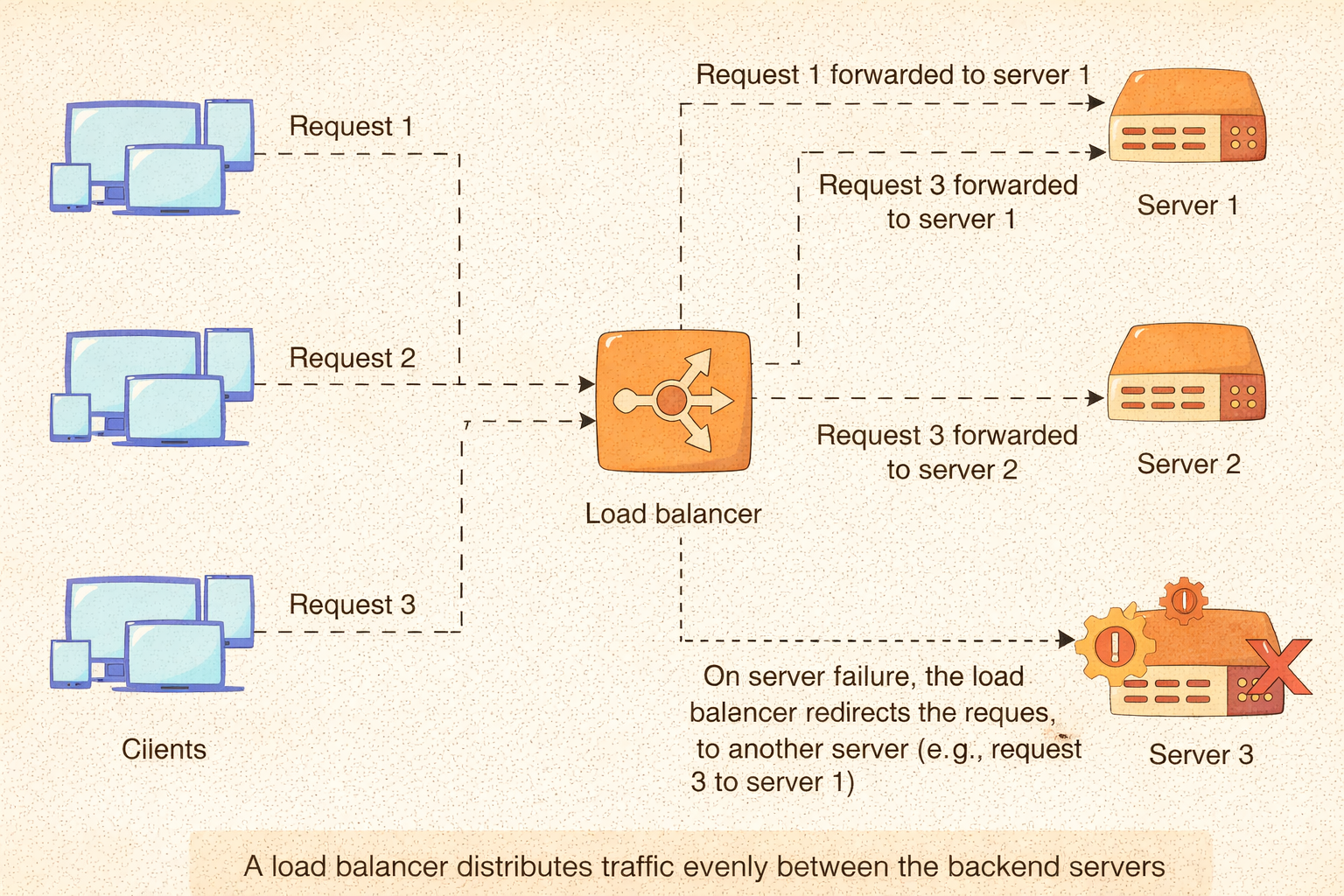
Load balancers distribute incoming traffic across multiple servers to prevent any single instance from becoming overwhelmed.
They can operate at different levels:
- DNS-based routing
- Network-level balancing
- Application-level balancing
Designing load-balancing strategies requires understanding traffic patterns, health checks, and failure handling.
Asynchronous processing and message queues

Not all work needs to happen synchronously. Message queues and background processing allow systems to:
- Handle spikes in traffic
- Improve responsiveness
- Decouple components
Queues introduce eventual consistency and require careful handling of retries, ordering, and failures.
Rate limiting and access control
To protect systems from abuse or overload, rate limiting is often applied.
Design decisions include:
- Where limits are enforced
- How limits are tracked
- How violations are handled
Rate limiting is closely tied to system reliability and user experience.
Content delivery networks (CDNs)
CDNs cache and serve static or semi-static content from locations closer to users.
They reduce:
- Latency
- Load on origin servers
- Bandwidth costs
Designers must decide what content can safely be served from the edge and how updates propagate.
Consistency models and tradeoffs
Distributed systems must balance consistency, availability, and partition tolerance.
Understanding consistency models helps designers reason about:
- Stale reads
- Write conflicts
- Eventual vs strong consistency
These tradeoffs are fundamental and unavoidable in large-scale systems.
Component decoupling and service boundaries
Well-designed systems isolate responsibilities into clearly defined components or services.
Benefits include:
- Easier scaling
- Independent deployments
- Improved fault isolation
Poor boundaries, however, can create tight coupling and operational complexity.
System Design Building Blocks
| Building Block | Primary Role | Key Responsibilities | Design Considerations |
|---|---|---|---|
| Clients & User Interfaces | Entry point to the system | Initiate requests, display responses, shape user experience | Request frequency, network reliability, latency tolerance, backward compatibility |
| APIs & Communication Boundaries | Define interaction contracts | Enable communication between components and services | Clear contracts, versioning strategy, failure handling, loose coupling |
| Application Layer (Business Logic) | Coordinate workflows | Enforce business rules and orchestrate operations | Statelessness, validation logic, error propagation, idempotency |
| Databases & Persistent Storage | Store durable data | Persist application state and system records | Read/write patterns, consistency needs, growth planning, backups |
| Gateways, Proxies & Edge Services | System boundary control | Handle cross-cutting concerns at the edge | Authentication, rate limiting, routing, TLS termination |
| Monitoring, Logging & Observability | System visibility | Surface metrics, logs, and traces for diagnostics | Early issue detection, debugging depth, operational insight |
Every system, regardless of scale or domain, is composed of a small set of recurring building blocks. These components may look different depending on the technology stack, but their responsibilities remain largely the same. Understanding these blocks helps you reason about how systems behave under load, during failures, and as they evolve over time.
Instead of thinking in terms of specific tools or frameworks, System Design focuses on roles and responsibilities within the architecture.
Clients and user-facing components
Clients are the starting point of any system interaction. They initiate requests, display responses, and define the user experience. From a System Design perspective, clients are not just consumers; they actively shape traffic patterns, latency expectations, and usage constraints.
Clients can include web browsers, mobile apps, desktop applications, IoT devices, or other backend services. Each type introduces different assumptions about network reliability, request frequency, and payload size. For example, mobile clients often operate on unstable networks and require defensive design around retries and timeouts.
Key considerations when designing client interactions include:
- How frequently requests are sent
- How failures are communicated to users
- How backward compatibility is maintained as APIs evolve
APIs and communication boundaries
APIs define how different parts of a system talk to each other. They form the contract between clients and services, and between internal components themselves. A well-designed API enables independent evolution of services without breaking consumers.
System Design emphasizes APIs that are:
- Clear and predictable
- Versioned thoughtfully
- Resilient to partial failures
Poor API boundaries often lead to tight coupling, where changes in one service ripple across the entire system. Over time, this makes systems brittle and difficult to scale.
Application layer and business logic
The application layer sits between the external interface and the data layer. This is where business rules are enforced, and workflows are coordinated. In System Design, the goal is to keep this layer stateless whenever possible.
Stateless application services are easier to replicate, scale horizontally, and recover during failures. Any required state, such as user sessions or workflow progress, is typically stored in external systems like databases or caches.
Design considerations at this layer include:
- How requests are validated
- How errors are propagated
- How idempotency is handled for retries
Databases and persistent storage
Databases provide durable storage for system data, but they are also one of the most common sources of bottlenecks and failures. System Design requires carefully matching storage technology to access patterns.
Relational databases are often chosen for structured data and transactional guarantees, while non-relational databases are used for flexible schemas or massive scale. Object storage may be used for large files, logs, or media assets.
Key storage decisions involve:
- Read vs write intensity
- Consistency requirements
- Data growth projections
- Backup and recovery strategies
Gateways, proxies, and edge services
Gateways and proxies sit at the boundary between clients and backend services. They handle cross-cutting concerns that should not be duplicated across every service.
These components commonly manage:
- Authentication and authorization
- Rate limiting and throttling
- Request routing and aggregation
- TLS termination
By centralizing these responsibilities, the system becomes easier to secure and monitor.
Monitoring, logging, and observability
Modern systems must be observable. This means engineers should be able to understand what the system is doing internally by looking at metrics, logs, and traces.
Monitoring allows teams to detect issues early, while logging provides the context needed to diagnose failures. Observability is not an afterthought; it must be designed into the system from the beginning.
Non-Functional Requirements
Non-functional requirements define how a system behaves rather than what it does. They often determine whether a system succeeds or fails in production, even if all functional requirements are met.
Scalability
Scalability refers to a system’s ability to handle increased load without degradation. System Designers must plan for growth even if the system starts small.
Scalability can be achieved by:
- Scaling vertically by adding resources
- Scaling horizontally by adding instances
Most modern systems favor horizontal scaling due to its flexibility and fault tolerance.
Reliability and fault tolerance
Failures are inevitable in distributed systems. Reliability focuses on minimizing the impact of those failures and ensuring the system continues to function.
- This involves:
- Redundant components
- Automatic failover mechanisms
- Graceful degradation
A reliable system assumes things will break and plans accordingly.
Availability and uptime
Availability measures how often a system is operational and accessible. High-availability systems are designed to remain online even during maintenance or partial failures.
Design strategies include:
- Replication across zones or regions
- Health checks and traffic rerouting
- Eliminating single points of failure
Performance and latency
Performance is about how quickly a system responds to requests. Latency expectations vary depending on use case, but users generally expect fast and consistent responses.
Improving performance often involves:
- Caching frequently accessed data
- Reducing network hops
- Optimizing database queries
Maintainability and operability
A maintainable system is one that engineers can understand, modify, and extend over time. Clear boundaries, documentation, and consistent patterns make long-term maintenance feasible.
Operability focuses on how easily the system can be deployed, monitored, and debugged in production.
Cost efficiency
System Design decisions directly affect cost. Over-provisioning wastes resources, while under-provisioning leads to outages.
Designers must balance:
- Performance requirements
- Infrastructure costs
- Engineering effort
Security and compliance
Security is a core System Design concern, not an add-on. Systems must protect data at rest and in transit, enforce access controls, and comply with regulatory requirements where applicable.
Design Patterns and Architectural Styles
| Pattern/Style | Core Idea | What It Optimizes For |
|---|---|---|
| Layered Architecture | Separate the system into presentation, application, and data layers | Clarity, maintainability, testability |
| Microservices/SOA | Decompose the system into small, independently deployable services | Scalability, team autonomy, and independent evolution |
| Event-Driven Architecture | Components communicate via events instead of direct calls | Loose coupling, asynchronous scaling, resilience |
| CQRS | Separate read and write models | Independent scaling, optimized queries |
| Event Sourcing | Store state as a sequence of events | Auditability, replayability, and strong historical insight |
| Serverless Architecture | Abstract infrastructure behind managed execution | Rapid scaling, reduced ops overhead, event-based workloads |
| Domain-Driven Design (DDD) | Model system around business domains | Clear ownership, reduced coupling, business alignment |
Design patterns provide reusable solutions to common System Design problems. Architectural styles define how components are organized at a higher level.
Layered architecture
Layered architectures separate concerns into distinct layers, such as presentation, application, and data layers. This improves clarity and testability but can introduce latency if overused.
Microservices and service-oriented systems
Microservices decompose systems into small, independently deployable services. This approach improves scalability and team autonomy but increases operational complexity.
Event-driven architecture
Event-driven systems communicate through events rather than direct calls. This decouples producers and consumers and enables highly scalable, asynchronous workflows.
CQRS and event sourcing
Command Query Responsibility Segregation separates write and read models, allowing each to scale independently. Event sourcing stores changes as a sequence of events rather than overwriting the state.
Serverless architecture
Serverless systems abstract infrastructure management away from developers. They are well-suited for event-driven workloads but require careful design around cold starts and execution limits.
Domain-driven design concepts
Domain-driven design emphasizes modeling systems around business domains rather than technical layers. Clear domain boundaries reduce coupling and improve system clarity.
A Step-by-Step Approach to System Design
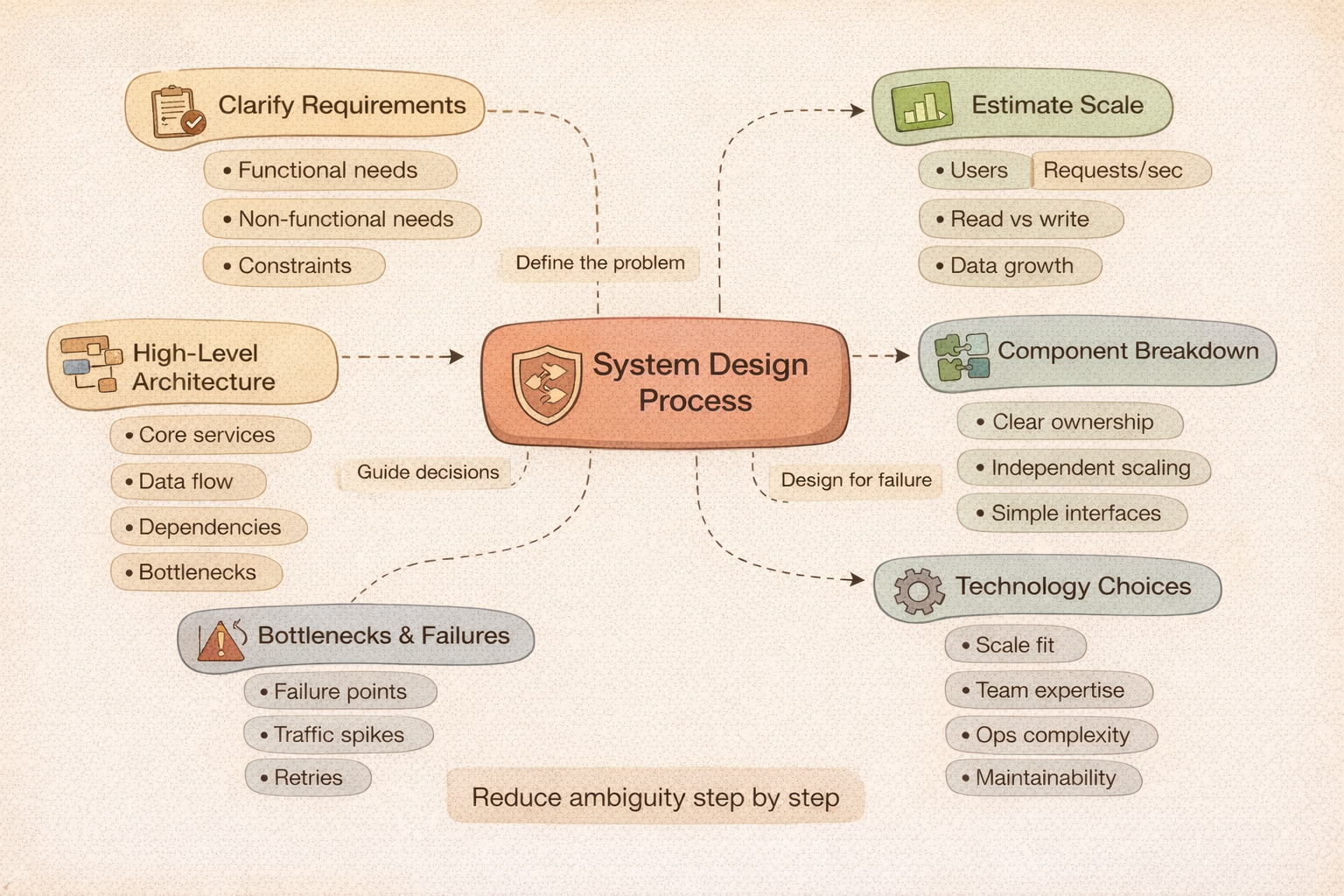
System Design problems are intentionally open-ended. Without a structured approach, it’s easy to get lost in details or make assumptions that later fall apart. A clear, repeatable process helps you stay grounded and communicate your thinking effectively.
Rather than jumping straight into architecture diagrams, strong System Designers move through a series of deliberate steps that progressively reduce ambiguity.
Clarifying requirements and constraints
Every System Design starts with understanding what problem you are solving. Requirements are often incomplete or vague, so asking clarifying questions is not optional; it is a core skill.
This stage focuses on identifying:
- Functional requirements (what the system must do)
- Non-functional requirements (scale, availability, latency, etc.)
- Constraints such as budget, deadlines, or existing infrastructure
A well-defined problem statement prevents overengineering and misaligned solutions.
Estimating scale and load
Once requirements are clear, the next step is to estimate how much load the system must handle. These estimates do not need to be perfectly accurate; they exist to guide architectural decisions.
Typical considerations include:
- Number of users (daily, monthly, concurrent)
- Request volume per second
- Read-to-write ratios
- Data growth over time
These rough calculations help you decide whether a single database is sufficient or whether you need sharding, caching, or asynchronous processing.
Designing a high-level architecture
At this stage, you sketch the major components of the system and how they interact. This includes identifying services, data stores, caches, and external dependencies.
The goal is not detail but clarity:
- What are the core components?
- How does data flow through the system?
- Where are potential bottlenecks?
A clean high-level design provides a shared mental model before diving deeper.
Breaking the system into components
After establishing the big picture, the system is decomposed into smaller, well-defined parts. Each component should have a clear responsibility and interface.
Good decomposition:
- Reduces coupling between components
- Enables independent scaling
- Simplifies testing and maintenance
Poor decomposition often results in tightly coupled services that are difficult to change without a widespread impact.
Addressing bottlenecks and failure points
No System Design is complete without considering what happens when things go wrong. This includes identifying single points of failure and performance bottlenecks.
Designers evaluate:
- What happens if a service crashes?
- How does the system behave under sudden traffic spikes?
- How are retries handled?
This step is where redundancy, caching, and graceful degradation strategies are introduced.
Making technology choices
Only after the design is clear do specific technologies come into play. Choosing tools too early can bias the design and hide deeper issues.
Technology decisions should be justified by:
- Scale requirements
- Team expertise
- Operational complexity
- Long-term maintainability
Good System Design focuses on why a technology is chosen, not just what is chosen.
Iterating and validating the design
System Design is rarely perfect on the first attempt. Designs improve through iteration, feedback, and validation.
This may involve:
- Reviewing assumptions
- Stress-testing the design mentally
- Incorporating feedback from peers
Iteration is a strength, not a weakness, in System Design.
Real-World System Design Examples
Theory becomes meaningful only when applied. Real-world examples demonstrate how abstract concepts come together to solve practical problems.
Rather than copying existing architectures, the goal is to understand the reasoning behind them.
Designing a scalable web application
A typical web application must handle user requests, persist data, and scale with demand. Key design choices include separating frontend and backend services, introducing load balancers, and using caches to reduce database load.
As traffic grows, the design evolves from a single server to a distributed system with multiple layers.
Designing a high-throughput data pipeline
Data pipelines ingest, process, and store large volumes of data. They often rely on asynchronous processing, message queues, and batch systems.
Designers must consider:
- Ingestion rate
- Backpressure handling
- Data consistency
- Failure recovery
These systems prioritize throughput and reliability over immediate consistency.
Designing a real-time messaging system
Messaging systems require low latency, high availability, and efficient fan-out. Design decisions include message storage strategies, delivery guarantees, and presence management.
Scalability is often achieved by partitioning users and messages across multiple servers.
Designing for fault tolerance
Fault-tolerant systems continue operating despite failures. This involves redundancy at multiple levels, from servers to data centers.
Designers plan for:
- Partial outages
- Network partitions
- Slow dependencies
The goal is not zero failure, but controlled failure.
Designing global systems
Global systems serve users across regions and time zones. Latency, data locality, and regulatory requirements become central concerns.
Designing such systems requires careful tradeoffs between consistency and performance.
Common System Design Challenges
Even well-designed systems encounter recurring challenges. Recognizing these patterns helps engineers respond effectively rather than reactively.
Traffic spikes and uneven load
Unexpected traffic surges can overwhelm systems. Effective designs use autoscaling, rate limiting, and buffering to absorb spikes.
Data consistency issues
Distributed systems frequently face stale reads and write conflicts. Designers must choose consistency models that match the business requirements.
Operational complexity
As systems grow, operational overhead increases. Monitoring, alerting, and automation become essential to manage complexity.
Cost overruns
Scalable systems can become expensive if not carefully managed. Designers must continuously balance performance with cost efficiency.
Legacy system constraints
Many systems must integrate with older components. Designing around legacy constraints requires pragmatism and incremental improvement.
Learning and Career Roadmap for System Design

System Design is a skill developed over time, not mastered overnight. Progression happens through exposure, practice, and reflection.
Beginner stage
At this stage, the focus is on understanding core concepts such as scalability, databases, and basic architectures.
Hands-on practice with small projects helps build intuition.
Intermediate stage
Intermediate engineers design multi-component systems and reason about tradeoffs. They begin to think in terms of failure modes and performance.
This is often when engineers prepare for System Design interviews.
Advanced stage
Advanced System Designers handle ambiguity, evaluate long-term impacts, and guide architectural decisions across teams.
They focus on simplicity, clarity, and sustainability.
Practice strategies
Effective learning combines theory with practice:
- Designing systems on paper
- Reviewing real architectures
- Analyzing postmortems
Wrapping up
System Design is not a single skill you “finish” learning. It is a way of thinking that develops as you build systems, watch them fail, fix them, and gradually understand why certain decisions hold up over time while others do not.
Throughout this guide, the goal was not to hand you a collection of architectures to memorize, but to help you build a mental framework. When you understand how requirements translate into constraints, how constraints shape architecture, and how tradeoffs appear at every layer, System Design stops feeling abstract. It becomes practical, even intuitive.
The strongest System Designers are not the ones who know the most tools. They are the ones who ask the right questions early, stay calm in the face of ambiguity, and design systems that are resilient, understandable, and adaptable. Whether you are preparing for interviews or designing real-world systems, the same principles apply: start simple, reason clearly, and evolve your design as reality pushes back.
If there is one takeaway from this guide, it is this: good System Design is less about complexity and more about thoughtful restraint.
Further learning and resources
If you want to continue building your system design skills beyond this guide, it helps to move from isolated concepts toward a more structured learning path. The resources below are organized to support that progression, from fundamentals to specialized domains and interview-focused preparation.
Core system design foundations
- Grokking the System Design Interview
A structured, example-driven course that walks through common system design interview problems and explains the reasoning behind architectural decisions. - System Design Interview Prep Crash Course
A faster-paced refresher designed for candidates who already understand the basics and want to sharpen their interview execution. - System Design Deep Dive: Real World Distributed Systems
Explores how large-scale systems behave in production, covering trade-offs, bottlenecks, and real-world constraints that don’t always show up in interview examples.
AI, ML & Generative AI